Ultra plan
What Perch Ultra includes, its Roost and manual-model limits, Claude Fable 5.1 and GPT-6 Astra, and how switching with Pro works.
Perch Ultra is the plan for heavy daily use. It costs $30 per month. It includes everything in Pro, no 5-hour limit, three times Pro's weekly limits on both usage lanes and three times its billing-period allowance for manual model selection, and two models only Ultra can pick: Claude Fable 5.1 and GPT-6 Astra.
Upgrade to Ultra or compare every plan.
The important part
Current Ultra limits
One Perch Token (PT) represents $0.001 of metered hosted-model usage. These are the standard limits currently enforced for Ultra accounts:
| Usage lane | Rolling 5 hours | Rolling 7 days | Billing period |
|---|---|---|---|
| Roost | No 5-hour limit | 60,000 PT | No fixed monthly cap; fair use applies |
| Manual model selection | No 5-hour limit | 112,500 PT | 225,000 PT |
The seven-day window is rolling, not a fixed block on a clock. Usage stops counting toward it as it becomes more than seven days old, so a used-up week frees gradually rather than all at once. The product shows when enough usage will leave the window for work to resume.
The manual billing-period allowance follows your subscription billing period and refreshes when that period renews. It does not reset on the first day of the calendar month unless that is also your renewal date.
Compared with Pro
| Limit | Pro | Ultra |
|---|---|---|
| Roost, rolling 5 hours | 5,000 PT | No limit |
| Roost, rolling 7 days | 20,000 PT | 60,000 PT |
| Roost, billing period | No fixed cap; fair use | No fixed cap; fair use |
| Manual, rolling 5 hours | 15,000 PT | No limit |
| Manual, rolling 7 days | 37,500 PT | 112,500 PT |
| Manual, billing period | 75,000 PT | 225,000 PT |
Ultra's weekly limits and its manual billing-period allowance are three times Pro's. See the Pro plan guide for how Pro's 5-hour windows work.
Roost usage
Roost chooses a model for the task. Ultra uses the same four Roost tiers as Pro: Standard, Standard Max, Pro, and Pro Max.
Roost has no fixed monthly PT allowance on Ultra and no 5-hour limit. You can keep using it throughout the billing period, subject to one rolling fair-use window:
- 60,000 PT in any rolling seven days
If the weekly Roost limit is reached, Roost pauses until enough earlier usage leaves that window. Manual model pins remain available if their separate limits have not been reached.
This window protects the shared service from runaway or automated bulk use. It applies across Perch AI Web, Desktop, and CLI because all three surfaces use the same account.
Manual model usage
A manual turn is one where you pin a named hosted model instead of letting Roost choose. Ultra can pin every model Pro can, plus Claude Fable 5.1 and GPT-6 Astra.
Manual usage has two limits of its own on Ultra, and no 5-hour limit:
- 112,500 PT in any rolling seven days
- 225,000 PT per subscription billing period
In dollars, that is $112.50 per rolling seven days and $225 per subscription billing period. Pro's manual allowance is $15 per rolling five hours, $37.50 per rolling seven days, and $75 per billing period. With no 5-hour window, the whole weekly amount is available in one sitting.
If the weekly manual limit is reached, named-model pins pause until usage leaves that rolling window. Roost remains available. If the 225,000 PT billing-period allowance is reached, switch back to Roost or wait for the next billing period.
Every pinned model draws from the same Ultra manual-selection allowance, including the two Ultra-only models. The amounts are shared limits, not separate allowances for each model.
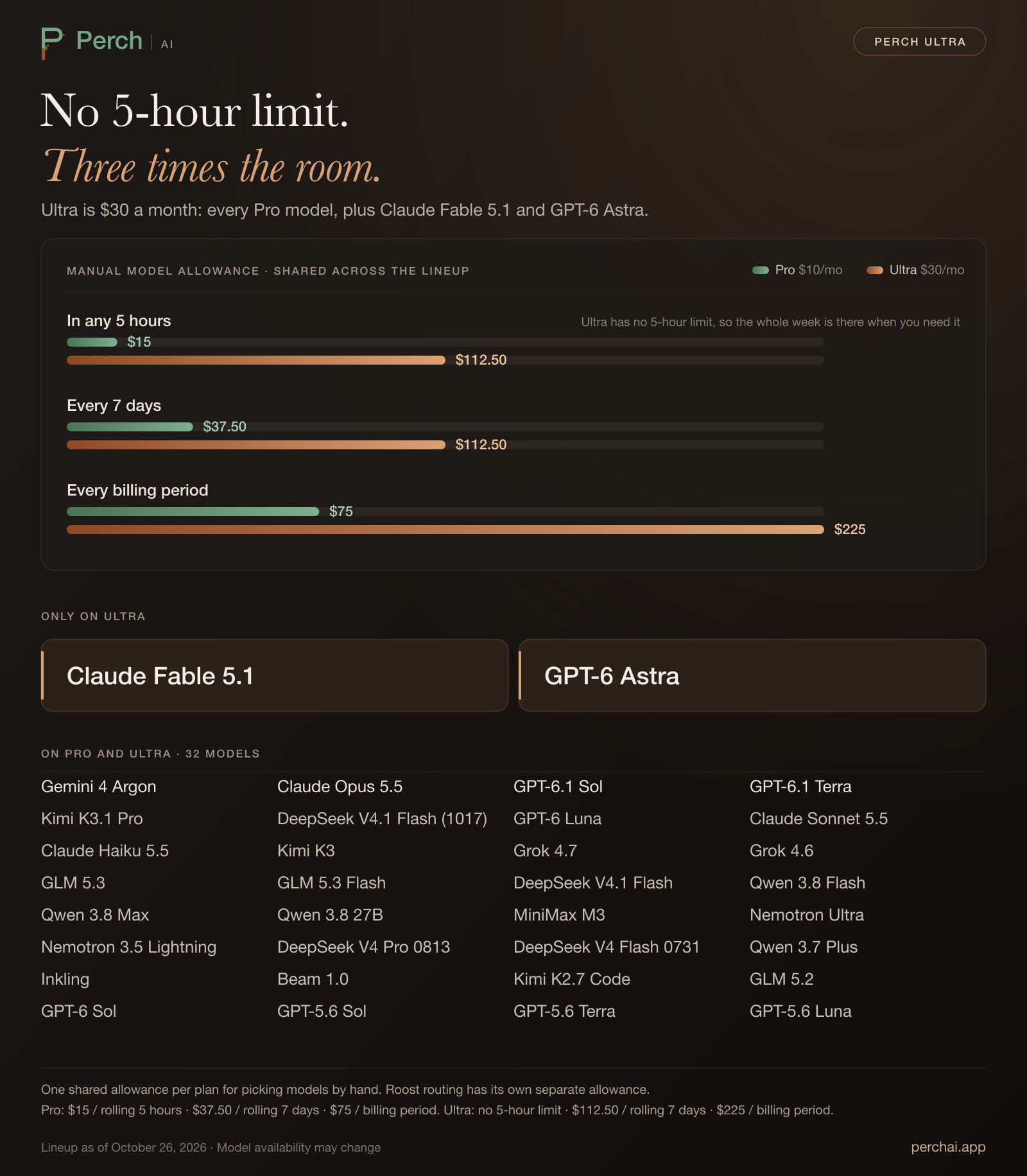
Open the full-size lineup graphic. Model availability may change; see the Models guide for current availability and rates.
Ultra-only models
Two models are available only on Ultra:
| Model | Context window | Maximum output |
|---|---|---|
| Claude Fable 5.1 | 1M tokens | 128K tokens |
| GPT-6 Astra | 1.05M tokens | 128K tokens |
Both are pinned only. You pick them by hand in the model picker, and Roost never chooses them. They draw from Ultra's manual allowance like every other pinned model. Their base rates are in the Models guide.
Claude Fable 5.1 data handling
Everything else matches Pro
Flock, the financial suites, cloud agents, Writing Studio and citation verification, images and scans, and voice dictation work on Ultra as they do on Pro. Ultra covers Perch AI Web, Desktop, and CLI under one account. Bring your own key works on Ultra, and usage paid to your provider does not consume Perch allowances. Direct API access is not included. See What Pro includes for the details.
Switching between Pro and Ultra
From Pro to Ultra. Your subscription and billing date stay the same. The prorated difference for the rest of the current billing period is charged right away, and Ultra's limits apply as soon as that payment succeeds. Usage you have already spent this period counts toward the bigger limits.
From Starter to Ultra. Upgrading goes through the normal checkout, as it does for Pro.
From Ultra to Pro. In Settings → Billing, choose Switch to Pro at renewal. The move takes effect at your next renewal, at Pro's $10 price, and Ultra stays active until then. Before the renewal you can choose Keep Ultra to stay on Ultra.
Billing and cancellation
Ultra is $30 per month, billed monthly. That is Ultra's list price.
You can cancel from Settings → Billing. Ultra stays active through the paid period, then the account moves to Starter. Perch does not automatically charge usage overages. Bring-your-own-key usage is billed separately by the provider whose key you use.
Data handling on Ultra
The Starter Data Program does not apply to interactions generated while Ultra is active, whether Ultra access is paid or complimentary. Bring-your-own-key and self-hosted usage is also excluded on every plan. Plan eligibility is determined when an interaction is generated, so upgrading to Ultra does not reclassify earlier Starter activity and a later move to Starter does not reclassify earlier Ultra activity.
Perch may process Ultra data as needed to provide, secure, maintain, debug, support, meter, and enforce the service, including by sending the material needed for a request to an approved inference provider. Perch does not sell or license Ultra User Content or customer-identifiable activity, or use it to train models or improve products for other customers. For Claude Fable 5.1, the model's host also keeps prompts and replies for up to 30 days and may have people review them for safety. See Security and data and the Privacy Policy for details.
Check your usage
Open Settings → Usage to see the active weekly Roost and manual windows, your manual billing-period allowance, and when constrained usage will become available again. In the CLI, run /usage.
Related pages
- Pricing compares Starter, Pro, Ultra, and Enterprise.
- Pro plan explains Pro's limits and Early Access price.
- Models lists the current hosted registry and base rates.
- Perch Roost explains automatic routing and tiers.
- Bring your own key explains usage outside Perch-hosted allowances.
- Security and data explains how Perch handles your files and model requests.
Pro plan
What Perch Pro includes, including Gemini 4 Argon and Claude Opus 5.5, how its separate Roost and manual-model allowances work, and what happens when a rolling limit is reached.
Model promotions
Free model offers, plan eligibility, how promotional usage counts, and what happens when an offer ends.